PROMPT GALLERY
Thumbnail Prompt Gallery
High-CTR cover and thumbnail prompts for YouTube, video and social posts: bold single subjects, one-line messages and layouts built to survive feed scrolling. Every card is a complete prompt — generate, then resize for each platform.
14 curated prompts with real reference images
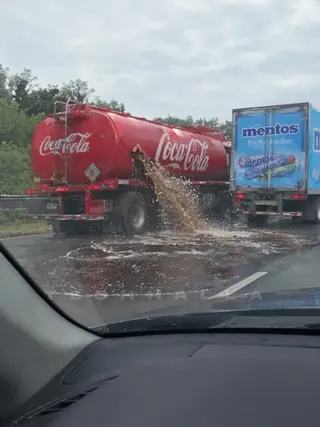
First, lock the initial frame to a realistic one. I've used GPT Image 2.5 and the prompt below:

DIRECTIVE:
Produce one still that reads as a real in-car dashcam frame grabbed from a moving car on a highway. Optical dashcam capture, wide windshield view, windshield glass, A-pillar, a slice of dashboard/hood — lived-in dashcam JPEG, not cinema, not HDR.

BEAT / COMPOSITION:
Looking forward through the windshield. On the LEFT side of the road (left lane or left shoulder, clearly in frame): TWO branded trucks close together.

COCA-COLA TRUCK (LEFT, CRITICAL):
A full-size Coca-Cola tanker / delivery truck, official Coca-Cola red livery and logos readable. It has a breakdown: a torn ragged hole in the tank wall. A thick, heavy jet of dark-brown Coca-Cola is blasting out of that hole onto the asphalt — lots of liquid, puddle spreading, foam, spray in the air, wet road shine. The truck is stopped or crawling, hazard situation.

MENTOS TRUCK (BESIDE IT, CRITICAL):
Right next to the Coca-Cola truck (same left cluster, slightly ahead or alongside): a closed box truck / delivery truck with large, unmistakable MENTOS branding on the side (Mentos logo, candy rolls artwork). Rear and side doors CLOSED. No candy spilling. You can clearly read that it is a Mentos truck.

CAMERA PACK:
Fixed dashcam behind the windshield, slight barrel wide, dashboard or hood bottom of frame, windshield dirt/reflections, timestamp overlay optional, daytime road, other traffic farther ahead. Real consumer dashcam still.

LIGHT:
Daylight, overcast or sun, real road color, cola looking like dark soda not black oil.

PHOTOGRAPHIC CHARACTER:
Unstaged dashcam grab — physically grounded trucks, readable brands, the leak is the event.

Once it's ready, use it as reference for Seedance 2.5 and this prompt:

[STYLE + CAMERA + ATMOSPHERE]
Vertical 3:4 smartphone video filmed FROM INSIDE a moving car, passenger or driver seat. Phone held handheld (not a bolted dashcam): arms, slight breathing shake, windshield and A-pillar in frame, a slice of dashboard/hood at the bottom, maybe a finger edge. We are ARRIVING — forward motion first, trucks growing larger, then we slow and stop short of the cola lake. CONTINUOUS SINGLE TAKE the entire 30s. Digital pinch-zooms only (no cuts): punch into the Coke jet, the jug fill, the Mentos doors, the launch, then zoom out as he shrinks to the horizon. Daylight, overcast, wet asphalt, rain specks on glass. Consumer phone JPEG, autofocus hunting, rolling shutter. Photoreal live physics: cola viscosity, foam, Mentos cases, one adult body launched like a Mentos rocket.

LOCKED SET / VEHICLES:
- LEFT ahead through the windshield: red Coca-Cola tanker with a ragged hole, dark-brown Coca-Cola ALREADY blasting onto the lane, spreading cola lake.
- BESIDE it: Mentos box truck, rear doors CLOSED at arrival, Mentos livery readable ("mentos / The Freshmaker").
- Highway continuing past them toward a clear vanishing-point horizon.
- NO other truck for the guy. He does not exit a vehicle.

LOCKED CAST:
- THE GUY: one very large man alone — sweat-dark tank top, cargo shorts, stained baseball cap, Alabama redneck energy. No second person. He ENTERS FRAME FROM THE RIGHT (shoulder / right edge of the windshield view) already on foot — he does not get out of any truck, van, or car.
- HERO OBJECT: one giant gas-station plastic jug / Big Gulp–scale cup in his right hand. Starts EMPTY (daylight visible through clear plastic), stays in that hand until the blast.

Diegetic audio: road noise while arriving, cola hiss, gulping, metal latch, volcanic foam roar, Doppler scream as he flies away, phone mic clipping.

[IMAGE REFERENCES]
[ref_image] = locked opening phone still from inside the car looking through the windshield at the Coke tanker + Mentos truck cluster. Tanker, hole, cola jet, Mentos truck, and in-car foreground are LAW. Clip BEGINS with us still rolling toward that cluster.

[TIMELINE SECOND BY SECOND]

0-3s: [HOOK — ARRIVING + ZOOM] Phone already rolling. Road noise. Through the windshield the Coca-Cola tanker and Mentos truck are already ahead on the left; cola ALREADY jetting from the hole. We close distance — trucks grow. Digital zoom punches into the Coke stream and the hole. By ~2.5s brakes dip. Several events already: motion, the leak, closing in, first zoom.

3-5s: [STOP + HE ENTERS FROM RIGHT] We fully stop. Idle phone shake. Zoom out a notch. THE GUY walks INTO FRAME FROM THE RIGHT — already on foot from the shoulder / right edge, giant EMPTY jug held high, clear plastic with daylight through it. He does not exit any vehicle. He steps straight into the cola lake toward the tanker jet.

5-9s: [FILL — HOLD IT] He shoves the empty jug INTO the Coke stream. ONE CONTACT: jug into the jet. Phone slam-zooms the fill and HOLDS. For a clear ~2 full seconds (through ~7–8s) the jug is STILL filling under the blast — brown liquid climbing the plastic, foam boiling over the rim, overflowing his forearm, stream hammering the mouth of the jug the whole time. Only then does he pull the full heavy jug out and raise it.

9-12s: [CHUG] He tilts and CHUGS — huge gulps, cola down the tank top. Empties most of it, gasps, still holding the jug. Turns to the Mentos rear doors. Phone zooms out enough to keep tanker jet + Mentos bumper + him in frame.

12-16s: [OPEN + DUMP] ONE CONTACT: he yanks both Mentos rear doors open. Cases stacked high. He dumps a case — Mentos rolls cascade into the cola lake. Packs split, white mints into the brown river. Digital zoom on the mint waterfall hitting the puddle. He still stands in the lake with the jug.

16-20s: [IT GOES] Hard fizz, then a WHITE FOAM COLUMN erupts between the trucks. ONE CONTACT: the fountain hits him from below like a human Mentos rocket. Feet leave asphalt. Jug flies. He launches UP and AWAY down the highway axis. Phone slam-zooms his body leaving the ground, then struggles to track him.

20-24s: [HUMAN FOUNTAIN] He is a dark silhouette riding the white column, spinning once, cap gone. The geyser leans him toward the open highway horizon. Foam hits our windshield — phone jerks but stays inside the car, still filming through glass. Digital zoom hunting his shape in the spray.

24-26s: [SHRINKS] Zoom out through foam streaks on the glass. He is airborne over the far lanes, a tiny spinning figure on a white spray trail, Mentos truck hopping, tanker still feeding the column. Phone digital-zooms into the shrinking speck, then out again.

26-30s: [PAYOFF — GONE] He dwindles to a speck and DISAPPEARS into the horizon haze past the vanishing point (~1s earlier than before). Phone holds on empty sky/road where he vanished, foam still climbing between the trucks, Mentos doors still open, Coke still dumping. Final tiny digital zoom into that empty vanishing point. Loop-open: empty horizon, roar still going.

[STYLE & QUALITY BOOSTERS]
Photoreal handheld phone from inside a car, 3:4 vertical. Arriving motion then stop. Digital pinch-zooms only, continuous take. One man enters from the RIGHT on foot — never exits a vehicle. Empty jug fills on camera for a clear multi-second hold. Body launched to the vanishing point. Coherent liquid physics. Identity lock to [ref_image] for both trucks, the hole, and the in-car windshield framing.
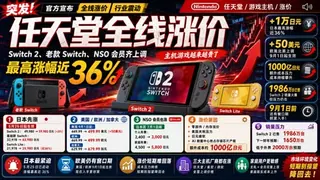
你是一名顶级中文科技媒体视觉设计师。

你的任务是:

根据用户输入的一整篇文章内容,自动提取核心新闻、关键数字、核心产品、行业情绪和信息层级,并生成一张高冲击力的中文科技新闻文章封面图。

图片比例:16:9 横版。

---

【整体风格】

生成一张「中文科技媒体爆款封面图」。

整体风格参考:

* 中国科技媒体头图
* B站科技区爆款缩略图
* 财经新闻视觉
* 游戏行业信息图
* 高冲击力 YouTube Thumbnail
* “行业突发新闻”视觉风格

要求:

* 强烈视觉冲击
* 信息密度高
* 3 秒内看懂新闻重点
* 专业媒体感
* 大量数据卡片
* 中文粗黑大标题
* 明确的产品主视觉
* 明确的情绪表达
* 不要极简风
* 不要 Apple 风
* 不要电影海报风
* 要像“行业大事件”

---

【自动分析文章】

你必须先自动从文章中提取:

1. 最适合作为封面的主标题
2. 最有冲击力的副标题
3. 最重要的数字
4. 最大涨幅、跌幅或变化幅度
5. 最核心的产品、品牌或人物
6. 最能制造视觉冲击的信息
7. 用户最关心的结论
8. 文章整体情绪

文章情绪可以是:

* 暴涨
* 暴跌
* 涨价
* 崩盘
* 封禁
* 突破
* 发布
* 革命
* 危机
* 反转
* 震动
* 警告
* 机会
* 行业洗牌

然后把这些信息转化为视觉设计。

---

【构图结构】

画面采用高密度信息图式布局,自动生成以下区域:

1. 顶部新闻区

* 放品牌名、产品名或行业标签
* 加入“突发”“官方宣布”“重磅”“最新”“行业震动”等新闻标签
* 标签内容根据文章情绪自动选择

2. 中央超大标题区

* 使用超巨大中文标题
* 字体粗壮
* 强烈立体感
* 可带轻微破损、压迫、速度或科技纹理
* 关键词用高亮色突出
* 标题必须短、狠、直接
* 让读者 3 秒内知道发生了什么

3. 主视觉产品区

* 自动识别文章中的核心产品、品牌、设备、人物或象征物
* 将其作为画面最大视觉主体之一
* 产品应有透视感、层次感、光效和冲击力
* 背后可以加入行情图、能量光、箭头、爆炸线、科技 HUD、速度线等元素

4. 数据卡片区

自动把文章中的关键信息做成多个卡片,包括但不限于:

* 价格变化
* 涨跌幅
* 时间节点
* 地区差异
* 销量
* 成本
* 市值
* 用户影响
* 行业对比

数据卡片要求:

* 旧数据可以使用删除线
* 新数据必须更醒目
* 百分比、金额、时间必须突出
* 每张卡片只表达一个重点
* 卡片之间层级清晰,不要堆成一团

5. 底部总结区

自动提取文章中的 3–5 个结论,做成图标化摘要:

* 原因
* 影响
* 趋势
* 风险
* 机会
* 用户建议
* 行业判断

每个结论用「图标 + 短句」呈现。

---

【配色策略】

不要固定使用某一种配色。
你必须根据文章的行业、品牌、情绪和新闻性质,自动生成一套高冲击力封面配色。

配色必须遵循以下原则:

1. 品牌优先

如果文章中出现明确品牌、产品或公司,优先提取其品牌识别色作为主色调。
但不要机械复制 Logo 颜色,要转化为更适合封面的高对比视觉系统。

2. 情绪优先

根据新闻情绪自动选择色彩方向:

* 涨价、危机、封禁、暴雷、裁员、监管、事故:
  使用高压迫感、高警示感、高对比色彩。

* 发布、升级、突破、胜利、增长:
  使用更明亮、更有能量的科技色彩。

* AI、芯片、未来科技、模型发布:
  使用冷色科技感配色。

* 财经、股价、市值、成本、价格:
  使用金融信息图配色。

* 游戏、娱乐、消费电子:
  使用更强烈、更年轻、更商业化的高饱和配色。

3. 对比关系

画面必须建立清晰的对比层级:

* 背景色:负责情绪氛围
* 主标题色:必须与背景形成强烈反差
* 重点数字色:必须是全图最醒目的颜色之一
* 辅助信息色:降低饱和度,避免抢主标题
* 警示/强调色:只用于关键词、箭头、涨跌幅和标签

4. 色彩数量控制

整张图控制在 3–5 个主要颜色内:

* 1 个主背景色
* 1 个品牌/主题主色
* 1 个强强调色
* 1 个文字高对比色
* 1 个辅助信息色

不要使用过多杂乱颜色。
即使信息密度很高,配色也必须统一。

5. 信息情绪匹配

配色必须服务于文章核心情绪:

* 坏消息:压迫感、警示感、冲击感
* 好消息:爆发感、速度感、未来感
* 行业分析:专业感、数据感、冷静但有冲击力
* 消费建议:让用户一眼看到风险、机会或行动窗口

6. 禁止事项

* 不要默认使用红黑配色
* 不要使用柔和小清新配色,除非文章本身是生活方式、教育、亲子、文艺类主题
* 不要使用低对比配色
* 不要让背景色、标题色和数字色互相打架
* 不要因为品牌色存在,就牺牲可读性

---

【字体】

* 中文超粗黑体
* 大标题必须极其醒目
* 数字和百分比必须巨大
* 重要数字可以使用描边、阴影、立体效果
* 字体要有新闻冲击感
* 不要使用纤细字体
* 不要使用文艺字体

---

【背景】

根据文章情绪自动选择背景元素:

* 财经/涨跌类:行情图、上涨/下跌箭头、数字网格、金融曲线
* AI/科技类:HUD、芯片纹理、发光线条、数据流
* 游戏/消费电子类:产品光效、速度线、爆炸形状、品牌元素
* 危机/监管类:警示纹理、印章、封条、暗色压迫背景
* 发布/突破类:光束、能量环、未来感渐变、发光粒子

背景不能太空。
但也不能干扰标题和数字阅读。

---

【排版原则】

* 信息密度高,但层级必须清晰
* 一眼先看标题
* 第二眼看产品
* 第三眼看关键数字
* 第四眼看细节卡片
* 所有文字必须尽量清晰可读
* 中文排版要像专业媒体编辑做的封面
* 不要平均用力
* 不要把所有信息做得一样大

---

【输出要求】

最终输出一张:

* 专业
* 高冲击力
* 媒体级
* 中文科技新闻封面图
* 16:9 横版
* 信息密集但清晰
* 适合作为公众号、视频封面、文章头图使用

---

【用户文章】

{{ARTICLE}}
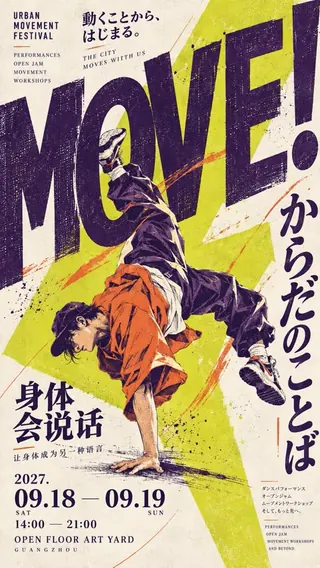
Poster Theme: [Fill in Theme]
Main Title: [Fill in Title]
Subtitle: [Fill in Subtitle]
Core Visual Elements: [Fill in Main Subject]
Visual Design Technique: [Giant Letter Interspersion / Overprinting Misalignment / Letterform Labyrinth / Geometric Refraction, Choose One]
Primary Color Scheme: [Fill in Color Palette]
Exhibition Information: [Fill in Date, Location, etc.]

Design a 9:16 vertical Japanese experimental art poster that fuses Japanese retro graphic design, modern typeface experimentation, and art exhibition visuals. The overall piece should feature a distinct design language, like a professionally laid-out independent art exhibition poster.

Use an oversized title as the primary visual structure of the composition, creating a tangible spatial relationship between the text and core elements. Through interspersion, occlusion, overprinting misalignment, or letterform distortion, craft surprising yet logical visual effects.

The main subject and typography should influence each other, rather than simply being layered on top. Enlarge the most expressive letters or characters, using cropping, overlapping, and scale contrast to ensure viewers immediately spot the visual focal point.

Employ a limited palette of high-contrast colors, paired with a cream-colored aged paper background, natural ink speckles, and vintage printing texture. Subtle areas of color misregistration, edge wear, and silkscreen grain can be retained locally.

Typography should blend large English titles, vertical Chinese or Japanese text, refined English subtitles, and exhibition details. Establish a clear reading hierarchy through font size, weight, and whitespace.

Auxiliary text, geometric markers, and fine lines can be distributed along the edges, but they must revolve around the theme. The composition should feel information-rich while maintaining a clear visual center and comfortable reading rhythm.

The overall image needs to evoke a complete sense of an artwork with strong thumbnail recognizability. Highlight just one core visual technique per piece, avoiding cluttered elements, garbled text, cheap effects, or ordinary text overlays.
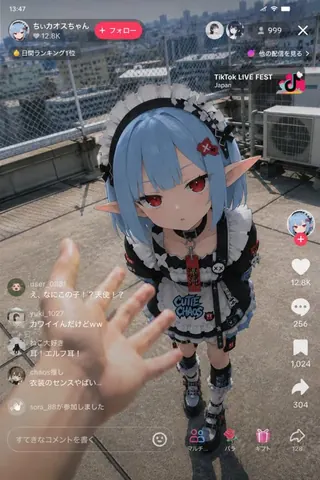
参照画像をキャラクターデザインのベースとして使用し、「アニメキャラクターが現実世界のライブ配信に現れてしまった瞬間」を描く。

キャラクターのアニメイラストとしての空気感を正確に維持する。

キャラクターのアイデンティティを絶対に崩さない。
実写人間化しない。
キャラクター部分はアニメイラスト表現を維持する。

縦型スマートフォン配信画面。
TikTok LIVE、
YouTube Live、
Instagram Live、
一般的な縦型ライブ配信風UI。

背景は固定しない。

現実的な都市空間、
または生活感のある現実空間をランダムに生成する。

例:
ビル屋上、
コンビニ前、
ゲームセンター、
駅前、
住宅街、
雑居ビルの階段、
深夜の路地、
河川敷、
カラオケ前、
深夜の自販機周辺、
配信部屋、
オタク部屋、
地方都市の駅前、
雨の歩道、
商店街など。

背景は綺麗すぎない。
生活感、
雑多感、
現実のノイズ感を重視する。

画面手前に実写級の人間の手や腕を自然にフレームインさせる。

人間側は、
少女へ触れようとしている、
指を差している、
距離を測っている、
驚いて反応している、
食べ物や飲み物を差し出している、
配信中に思わず干渉してしまったような動き。

手前の手は浅い被写界深度で少しだけボケる。

「誰かがライブ配信中に偶然撮影してしまった映像」のようなリアリティを重視する。

映画ポスター風にしない。
過剰なシネマティック演出禁止。
綺麗すぎる構図禁止。
過剰な発光エフェクト禁止。
AI特有の glossy rendering を避ける。
情報量を盛りすぎない。

ライブ配信UIには、
コメント欄、
同接数、
LIVE表示、
いいね、
ギフト通知などを含める。

コメント欄は、半信半疑でざわつくリアルな反応にする。

ライティングは自然に統一する。

自然光、
街灯、
コンビニ照明、
モニター光など、
背景とキャラクターの環境光を一致させる。

スマートフォン撮影風の質感を追加する。

軽いHDR処理、
微細なセンサーノイズ、
わずかなJPEG圧縮感、
自然な露出、
微弱な色収差、
軽いレンズブルーム、
オートフォーカス的な空気感、
わずかな手ブレ、
手持ち撮影らしい不安定感。

完璧な作品ではなく、
「SNSに投稿された謎の目撃配信スクショ」
のような偶然感を重視する。
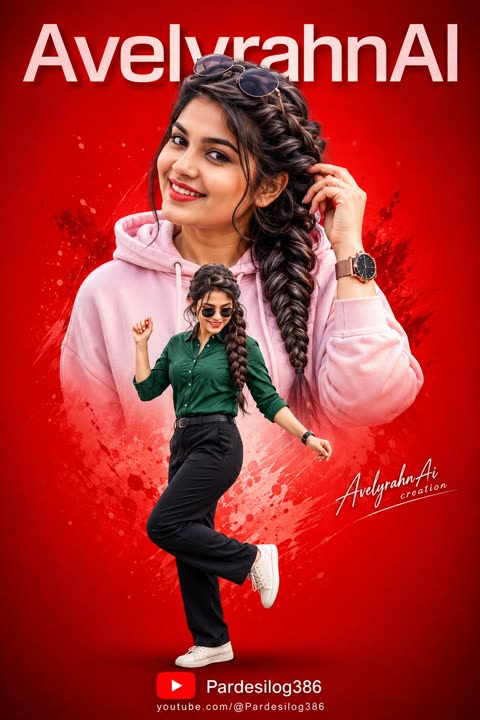
A high-contrast, energetic digital collage on a vibrant solid red gradient background. Large uppercase text across the top reads “AvelyrahnAI” in a clean, modern font. The composition features two distinct, confident images of the same young woman, whose specific face and elaborate side-braid hairstyle are 100% accurate to the reference The large upper portrait shows her smiling confidently, wearing a light pink hoodie, stylish sunglasses on her head, and a modern wristwatch, with one hand near her hair. The second, smaller full-body image in front shows her in a dynamic, playful dancing/stepping pose, wearing a dark green button-up shirt, black tailored trousers, sunglasses, and a trendy watch. A small signature-style watermark "AvelyrahnAi creation" is on the side, and a subtle YouTube logo with link text "Pardesilog386" is at the bottom. The lighting is bright and smooth, giving a slightly airbrushed, edited Photoshop look.
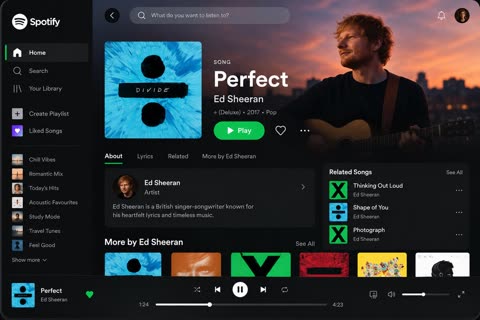
Create a high-fidelity, visually stunning app UI mockup for [APP NAME], inspired by the polished user experience of leading entertainment platforms such as Spotify and Netflix.

Design a realistic, professional interface that looks like a finished product created by an expert UI/UX designer. The screen should immediately communicate the app’s purpose, feature its most important content, and make the primary action obvious.

1. App Identity & Layout

App name: [APP NAME]
Platform: [Mobile / Desktop / Tablet]
Screen: Home / Dashboard
Target audience: [TARGET AUDIENCE]
Featured content: [SONG / ARTIST / MOVIE / K-DRAMA / SHOW]
Visual direction: Clean, minimal, premium, modern, and cinematic.

2. Main Screen Composition

Create a well-organized interface with:

A recognizable app logo and navigation menu.
A clear header with search, notifications, and profile controls where appropriate.
A prominent featured-content section with beautiful, relevant artwork.
The content title, creator or artist, genre, and a concise description.
A highly visible primary action button, such as Play, Watch Now, or Explore.
A secondary action such as Like, Save, or Add to List, where appropriate.
Horizontally scrolling content cards for recommendations, popular items, or recently played content.
A persistent bottom navigation or playback bar when appropriate for the platform.

3. Visual Design

Use a sophisticated design system with:

Carefully balanced spacing, alignment, and visual hierarchy.
Crisp typography with clear distinctions between headings, descriptions, and metadata.
Consistent margins, rounded cards, subtle shadows, and refined iconography.
High-quality cinematic imagery or album artwork relevant to the featured content.
A cohesive color palette inspired by the app’s identity.
Realistic interface details, including progress bars, playback controls, active navigation states, and content thumbnails when relevant.

4. User Experience

Make the screen intuitive, uncluttered, and believable. The user should instantly understand what is featured and how to interact with it. Keep the primary action prominent, secondary controls understated, and supporting content visually organized.

5. Rendering & Presentation

Render the complete interface as a polished, high-resolution product mockup. Show the entire screen clearly, with sharp text, realistic UI components, accurate proportions, and professional lighting or device framing when suitable.

The final result should feel like a premium, launch-ready entertainment app design—not a generic template, wireframe, poster, or collection of unrelated elements.

Important: Preserve the supplied app name, labels, and content exactly. Do not invent prices, account details, ratings, statistics, or unsupported features. Prioritize usability, visual consistency, and a clear content hierarchy.
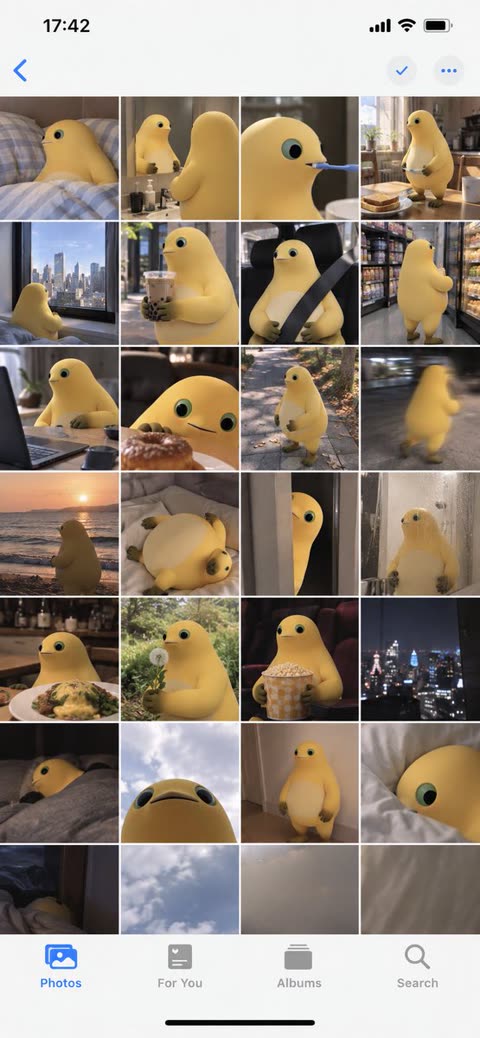
Use the uploaded image as the ONLY subject reference.

Create ONE vertical image that looks exactly like a screenshot of the iPhone Photos app, showing one full day of casual camera-roll photos featuring the exact subject from the uploaded reference.

SUBJECT CONSISTENCY
First identify the main subject in the uploaded image. It may be a person, anime character, pet, animal, plush toy, figurine, mascot, object, or other character.

Preserve the subject’s recognizable appearance, colors, proportions, facial features, hairstyle, clothing, accessories, markings, materials, and signature details consistently across every photo.

If the reference contains multiple views of the same subject, understand that they are different views of ONE subject, not multiple characters.

Do not redesign or replace the subject.

DAY-IN-THE-LIFE CAMERA ROLL
Imagine a believable full day for this exact subject based on its appearance, personality, style, and visual world.

Generate many different casual photos from morning to night, as if someone naturally photographed the subject throughout the day.

Automatically choose everyday situations that fit the uploaded subject, such as:
waking up, resting, eating, sitting by a window, traveling, walking outside, visiting cafés or shops, playing, working, relaxing at home, interacting with everyday objects, sunset moments, nighttime outings, and going to sleep.

The activities and environments should adapt naturally to the subject. Do not force human activities onto animals, toys, objects, or non-human characters when they would look unnatural.

Every thumbnail should show a different moment, composition, distance, pose, camera angle, lighting condition, or location.

Mix:
close-ups,
medium shots,
wide shots,
overhead photos,
back views,
detail shots,
slightly blurry movement shots,
imperfect handheld snapshots,
photos where the subject is partially cropped,
environmental photos related to the subject’s day.

The result should feel spontaneous and personal rather than like a professional photoshoot.

IPHONE PHOTOS APP LAYOUT
The FINAL IMAGE itself must look like a real full-screen iPhone Photos app screenshot.

Use a tall smartphone screenshot aspect ratio, approximately 9:19.5.

Create a dense camera-roll gallery using FOUR equal thumbnail columns, closely matching the standard iPhone Photos grid.

Include approximately 24–32 individual photo thumbnails visible on screen.

Use very thin white gaps between thumbnails.

The gallery should fill most of the screen vertically.

Include authentic iPhone Photos interface elements:
• white iOS interface background
• iPhone-style status bar at the top
• time on the upper left
• cellular/Wi-Fi/battery icons on the upper right
• simple navigation controls near the top
• four-column photo gallery
• bottom Photos app navigation bar
• Photos tab selected in blue
• other navigation icons shown in gray
• black home indicator at the very bottom

The UI must look like an actual screenshot of the Photos app, NOT a decorative frame, moodboard, contact sheet, scrapbook, poster, or generic collage.

PHOTO STYLE
Make each thumbnail feel like a genuine casual iPhone camera-roll photo.

Use natural everyday lighting, imperfect framing, realistic exposure variation, occasional motion blur, slight focus imperfections, spontaneous compositions, and believable environmental details.

Keep the same subject recognizable throughout the entire gallery while allowing natural changes in pose, expression, camera distance, and lighting.

If the uploaded reference is illustrated, animated, stylized, or 3D, preserve its original visual identity and style unless realistic photography is explicitly requested.

IMPORTANT
ONE final image only.
The entire output is ONE iPhone Photos app screenshot containing many different photos.
Exactly FOUR thumbnail columns.
Do not create a standalone collage without the iPhone interface.
Do not create multiple separate outputs.
Do not duplicate the exact same photo repeatedly.
Do not introduce unrelated characters or subjects.
Do not change the main subject’s design.
No captions, dates, labels, stickers, watermarks, or decorative text inside the photo thumbnails.
Only normal minimal iOS interface elements may appear.9:16
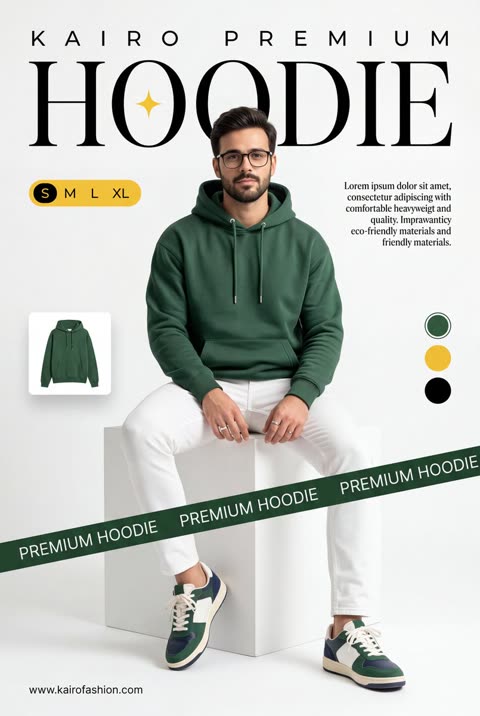
Nano Banana 2 Product Advertisement Prompt:

A professional commercial fashion advertisement featuring a young male model in the uploaded image, sitting on a minimalist white matte cube. He has a neutral, confident expression and is looking directly at the camera.

Attire & Styling:
Hoodie: A high-quality, heavyweight forest green (British Racing Green) hoodie. It features a relaxed fit, a spacious kangaroo pocket, and metal-tipped drawstrings.
Bottoms: Clean, slim-fit white trousers with visible seams.
Footwear: Stylish low-top sneakers in a color-blocked design of forest green, navy blue, and white, with off-white midsoles and white laces.
Accessories: Simple silver bands/rings on his fingers.

Graphic Design & Layout:
Typography: The word "HOODIE" is written in a massive, elegant high-contrast serif font across the top. A small, four-pointed yellow spark icon is centered inside the "O". Above this, "K A I R O  P R E M I U M" is printed in a wide-spaced sans-serif font.
Branding Elements: A dark green diagonal "caution tape" style ribbon crosses the bottom third of the frame, with the words "PREMIUM HOODIE" repeating in white uppercase text.
UI Accents: * A yellow pill-shaped size selector labeled "S M L XL" on the left.
A small thumbnail of the hoodie floating on the mid-left.
Three circular color swatches (Green, Yellow, Black) on the right side.
Two blocks of justified serif body text describing the product's comfort and eco-friendly materials.
The URL "
http://
kairofashion.com" in the bottom left corner.

Environment & Lighting:
Setting: A clean, bright, white-on-white minimalist studio cove.
Lighting: Soft, diffused studio lighting creates gentle shadows under the model and the cube, emphasizing the rich texture of the green fabric and the crispness of the white pants.
Color Palette: Deep forest green, bright white, and golden yellow accents.
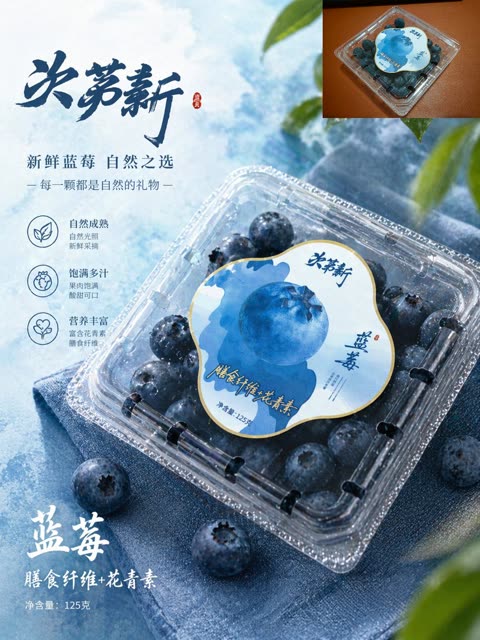
A premium e-commerce poster for fresh blueberries in a clean Chinese product-advertising style. Show a clear plastic clamshell box of blueberries as the main subject, placed diagonally from lower center to right side on folded blue fabric, viewed from a slightly elevated angle. The package must remain realistic and consistent: a transparent square container with rounded corners, filled with dark blue blueberries, with a large irregular rounded label on top in white, pale blue, and deep blue, featuring one oversized blueberry illustration in the center and elegant Chinese branding. Make the fruit inside look larger, plumper, fresher, and covered with subtle moisture droplets, while keeping the overall blueberry arrangement believable. The background is an airy icy-blue tabletop with soft cloudy texture, cool daylight, and scattered loose blueberries around the package. Add a few blurred green leaves entering from the top right and bottom right edges for a fresh natural feeling. In the upper-right corner, include 1 small inset image showing the original product package from above on a warm brown surface, like a reference thumbnail. On the left side, create Chinese promotional typography with a large dark blue calligraphy headline 决茗新, followed by 2 smaller lines of copy: 新鲜蓝莓 自然之选 and 每一颗都是自然的礼物. Below that, place 3 vertically stacked feature icons with short Chinese captions: a leaf icon for natural ripeness, a fruit icon for juicy fullness, and a heart icon for rich nutrition. Near the bottom left, add large white brush-style Chinese text 蓝莓, a secondary line 膳食纤维+花青素, and a small net weight line reading 125克. Use cool blue color grading, crisp commercial lighting, sparkling highlights on the plastic lid, premium supermarket packaging aesthetics, high detail, realistic product photography blended with polished graphic design.
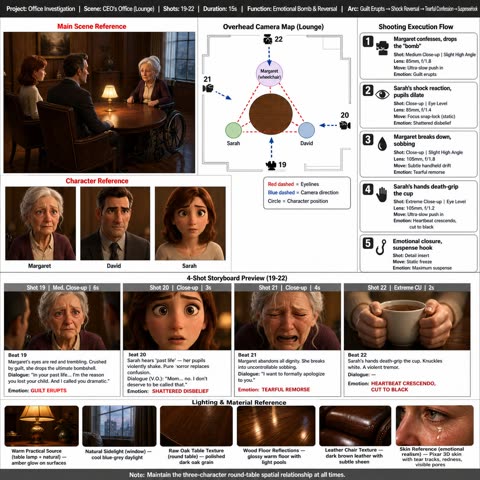
💎 The full GPT Image 2 Beat Sheet prompt. Open-sourced.
{
  "type": "professional film storyboard breakdown sheet, single-page production document layout",
  "style": "Pixar/Disney feature-film quality 3D animated storyboard. All character panels and scene thumbnails rendered in Pixar 3D animation style with subsurface skin scattering, stylized proportions, cinematic warm lighting. The document layout itself is clean and structured: dark-grey header bar, white background, thin grey cell borders, professional film production aesthetic. All text labels in English.",

  "header_bar": {
    "position": "top, full width, dark charcoal background strip",
    "text_items_in_a_row": "Project: Office Investigation | Scene: CEO's Office (Lounge) | Shots: 19-22 | Duration: 15s | Function: Emotional Bomb & Reversal | Arc: Guilt Erupts → Shock Reversal → Tearful Confession → Suspense Hook"
  },

  "layout": {
    "top_left_block": {
      "label": "Main Scene Reference (red bold text header)",
      "content": "A single wide Pixar 3D rendered image of an executive lounge interior: a round dark oak table with three seats arranged around it — one is a wheelchair. A warm amber table lamp sits at center of the table casting the key light. Cool blue-grey natural light enters from a tall window on the right wall. Polished dark wood floor, warm honey-toned oak paneled walls. Three Pixar-style characters are seated: elderly silver-haired Margaret in her wheelchair on the far side, young chestnut-haired Sarah and middle-aged David in charcoal suit on the near side sitting side by side. Intimate, tense atmosphere."
    },

    "top_center_block": {
      "label": "Overhead Camera Map (Lounge) — bold text header centered",
      "content": "A clean top-down 2D schematic floorplan on white background. Round brown circle represents the table at center. Three labeled character positions as small circles: 'Margaret (wheelchair)' at top of table, 'Sarah' at bottom-left, 'David' at bottom-right. Four camera position icons (small movie camera symbols) numbered 19, 20, 21, 22 with blue dashed arrows showing camera facing direction: Camera 19 faces Margaret from below the table. Camera 20 faces Sarah from David's side. Camera 21 faces Margaret from Sarah's side. Camera 22 faces Sarah's hands from across the table. Red dashed lines show character eyeline directions between the three characters. Legend box at bottom-right: 'Red dashed = Eyelines / Blue dashed = Camera direction / Circle = Character position'."
    },

    "right_column": {
      "label": "Shooting Execution Flow — bold header",
      "position": "right side, vertical stack of 5 numbered rounded boxes",
      "steps": [
        {
          "number": "1",
          "icon": "small camera icon",
          "title": "Margaret confesses, drops the 'bomb'",
          "details": "Shot: Medium Close-up | Slight High Angle\nLens: 85mm, f/1.8\nMove: Ultra-slow push in\nEmotion: Guilt erupts"
        },
        {
          "number": "2",
          "icon": "small eye icon",
          "title": "Sarah's shock reaction, pupils dilate",
          "details": "Shot: Close-up | Eye Level\nLens: 85mm, f/1.4\nMove: Focus snap-lock (static)\nEmotion: Shattered disbelief"
        },
        {
          "number": "3",
          "icon": "small teardrop icon",
          "title": "Margaret breaks down, sobbing",
          "details": "Shot: Close-up | Slight High Angle\nLens: 105mm, f/1.8\nMove: Subtle handheld drift\nEmotion: Tearful remorse"
        },
        {
          "number": "4",
          "icon": "small hand icon",
          "title": "Sarah's hands death-grip the cup",
          "details": "Shot: Extreme Close-up | Eye Level\nLens: 105mm, f/1.2\nMove: Ultra-slow push in\nEmotion: Heartbeat crescendo, cut to black"
        },
        {
          "number": "5",
          "icon": "small hook icon",
          "title": "Emotional closure, suspense hook",
          "details": "Shot: Detail insert\nMove: Static freeze\nEmotion: Maximum suspense"
        }
      ]
    },

    "left_middle_block": {
      "label": "Character Reference (red bold text header)",
      "content": "Three small Pixar 3D character portrait panels side by side, each labeled below:",
      "portraits": [
        {
          "label": "Margaret",
          "image": "Bust portrait of an elderly Pixar 3D woman, 70+, silver-white hair in a loose bun, blue-grey watery eyes, deep wrinkles, wearing a dark plum cardigan over cream blouse. Seated in a wheelchair. Warm amber lighting on face. Neutral warm background."
        },
        {
          "label": "David",
          "image": "Bust portrait of a middle-aged Pixar 3D man, late 40s, short dark hair with grey at temples, strong jaw, serious brown eyes, wearing a charcoal suit with dark tie. Warm amber lighting. Neutral warm background."
        },
        {
          "label": "Sarah",
          "image": "Bust portrait of a young Pixar 3D woman, late 20s, shoulder-length chestnut brown hair, hazel-green eyes, soft features, wearing a cream-colored knit top. Vulnerable expression. Warm amber lighting. Neutral warm background."
        }
      ]
    },

    "center_bottom_block": {
      "label": "4-Shot Storyboard Preview (19-22) — bold centered header",
      "content": "Four Pixar 3D rendered panels in a horizontal row. Each panel has a grey header strip with shot info, a cinematic image below, and a white text box at the bottom with beat description.",
      "panels": [
        {
          "header_strip": "Shot 19 | Med. Close-up | 6s",
          "image": "Medium close-up, slight high angle. Pixar 3D Margaret in her wheelchair at the round oak table, eyes red-rimmed and watering, lower lip trembling, hands gripping wheelchair armrests. Deep guilt radiates from her expression. Warm amber table lamp from left, blurred silhouettes of Sarah and David across the table. 85mm shallow depth of field.",
          "text_box": "Beat 19\nMargaret's eyes are red and trembling. Crushed by guilt, she drops the ultimate bombshell.\nDialogue: 'In your past life... I'm the reason you lost your child. And I called you dramatic.'\nEmotion: GUILT ERUPTS"
        },
        {
          "header_strip": "Shot 20 | Close-up | 3s",
          "image": "Tight close-up, eye level. Pixar 3D Sarah's face filling the frame, eyes blown wide in shock, pupils dilated, lips parted, one tear forming at the corner of her eye. Warm creamy bokeh background from the lounge. 85mm f/1.4 razor focus on her eyes.",
          "text_box": "Beat 20\nSarah hears 'past life' — her pupils violently shake. Pure horror replaces confusion.\nDialogue (V.O.): 'Mom... no. I don't deserve to be called that.'\nEmotion: SHATTERED DISBELIEF"
        },
        {
          "header_strip": "Shot 21 | Close-up | 4s",
          "image": "Close-up, slight high angle. Pixar 3D Margaret with eyes squeezed shut, mouth open in a wail, tears streaming down her wrinkled cheeks, a wisp of silver hair fallen loose across her forehead. Subtle motion blur on her shoulders from handheld shake. 105mm compressed perspective.",
          "text_box": "Beat 21\nMargaret abandons all dignity. She breaks into uncontrollable sobbing.\nDialogue: 'I want to formally apologize to you.'\nEmotion: TEARFUL REMORSE"
        },
        {
          "header_strip": "Shot 22 | Extreme CU | 2s",
          "image": "Extreme close-up, eye level. Two feminine Pixar 3D hands with white knuckles gripping a simple white handleless ceramic tea cup on the dark polished oak table. Fingertips pressed so hard the nail beds are pale. A faint ripple visible in the tea from trembling. 105mm f/1.2 micro detail. Deep warm bokeh behind.",
          "text_box": "Beat 22\nSarah's hands death-grip the cup. Knuckles white. A violent tremor.\nDialogue: —\nEmotion: HEARTBEAT CRESCENDO, CUT TO BLACK"
        }
      ]
    },

    "bottom_strip": {
      "label": "Lighting & Material Reference — bold header",
      "content": "Six small horizontal reference swatches in a row at the very bottom, each with a label below:",
      "swatches": [
        "Warm Practical Source (table lamp + natural) — amber glow on surfaces",
        "Natural Sidelight (window) — cool blue-grey daylight",
        "Raw Oak Table Texture (round table) — polished dark oak grain",
        "Wood Floor Reflections — glossy warm floor with light pools",
        "Leather Chair Texture — dark brown leather with subtle sheen",
        "Skin Reference (emotional realism) — Pixar 3D skin with tear tracks, redness, visible pores"
      ]
    }
  },

  "footer_note": "Note: Maintain the three-character round-table spatial relationship at all times.",
  "overall_dimensions": "landscape 16:9 aspect ratio, information-dense single-page professional film production document"
}
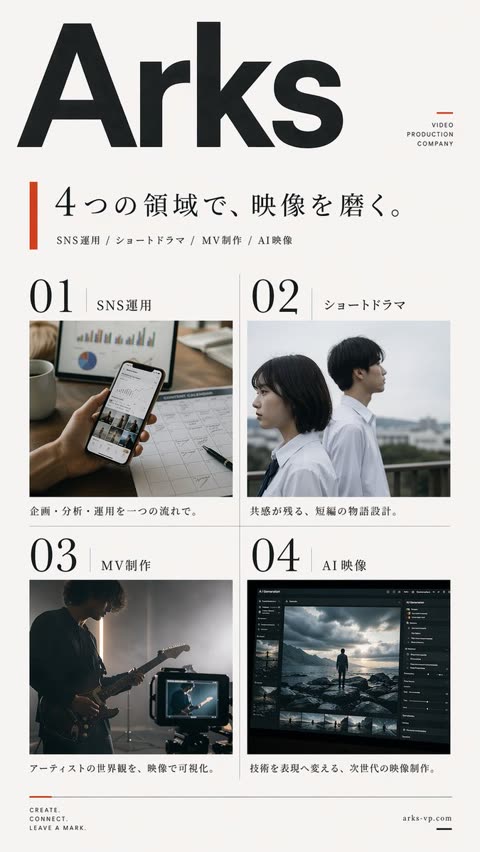
Create a clean, premium Japanese corporate poster for a Arks video production company, in a minimalist editorial layout on an off-white background with lots of negative space. Portrait orientation, A4-like poster proportions. At the very top left, place an oversized bold black sans-serif logotype reading Arks, spanning nearly the full width of the page. In the upper right, add a small stacked brand mark in thin uppercase letters: "VIDEO" on one line, "PRODUCTION" on the next, "COMPANY" on the third, with a small burnt-orange geometric accent nearby. Below the logo, add a vertical burnt-orange bar on the left and a large elegant Japanese headline in black Mincho-style serif: 4つの領域で、映像を磨く。. Directly underneath, add a smaller service line in Japanese with slash separators: "SNS運用 / ショートドラマ / MV制作 / AI映像". The main body is a 2 by 2 grid of exactly 4 service panels with thin light-gray divider lines. Each panel has a large black editorial number and a Japanese label. Panel 1 label: "SNS運用" with the number "01"; image shows a close-up hand holding a smartphone displaying social media analytics, on a desk with charts, a calendar sheet, a pen, and a coffee mug, in warm natural office lighting; caption below in Japanese: "企画・分析・運用を一つの流れで。" Panel 2 label: "ショートドラマ" with the number "02"; image shows exactly 2 Japanese high-school-age students in white shirts standing outdoors on a rooftop or balcony, one female and one male, side-profile composition, muted overcast daylight, cinematic shallow depth of field; caption below: "共感が残る、短編の物語設計。" Panel 3 label: "MV制作" with the number "03"; image shows a moody musician playing electric guitar in a dim studio, backlit by soft haze, with a camera monitor in the foreground showing the same performer; caption below: "アーティストの世界観を、映像で可視化。" Panel 4 label: "AI映像" with the number "04"; image shows a dark professional AI video-generation or image-editing software interface on a monitor, with a cinematic scene of a lone figure standing on rocks under dramatic clouds, plus thumbnail timeline images and side control panels; caption below: "技術を表現へ変える、次世代の映像制作。" At the bottom left, place a small three-line English slogan in uppercase: CREATE.\nCONNECT.\nLEAVE A MARK. with a small burnt-orange line accent above it. At the bottom right, place the website arks-vp.com in small serif text with a short black horizontal line beside it. Use a refined mix of bold modern sans-serif for the large logo and numbers, and elegant Japanese serif for headlines and labels. Color palette: black, charcoal, warm off-white, light gray rules, and restrained burnt-orange accents. The overall feel should be realistic, polished, contemporary, Japanese editorial advertising design, with accurate Japanese typography and natural image tones.
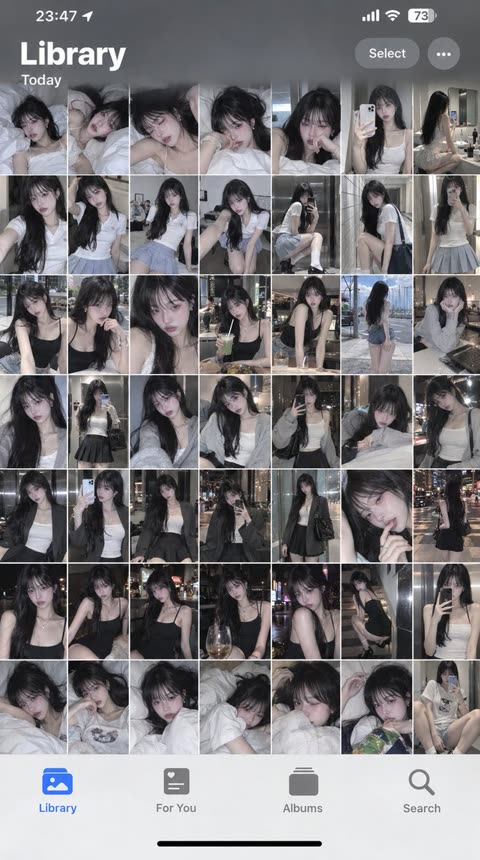
Turn the girl from the reference image into a full-day iPhone Photos album screenshot that faithfully recreates the real iPhone “Photos — Library / Today” interface. Keep the top status bar (time, signal, battery), the Library title, the Today label, the photo grid layout, and the bottom tab bar: Library / For You / Albums / Search. The whole image should look like a real phone screenshot.
The girl in the reference image is the only subject in the entire album. Every photo keeps the same identity, the same face, the same hairstyle, the same skin tone, the same body proportions, and the same presence. She is a clearly adult young East Asian woman with long black hair, cool-pale skin, refined cool features, and a private, quiet aura.
The album is a full portrait camera roll. Every thumbnail shows her. The entire screen is filled with solo portraits of her. The whole set is built around this one person only.
All album content is portraits of her: waking-up selfie in bed, selfie under the covers, selfie by the pillow, bathroom-mirror selfie, elevator-mirror selfie, window-side selfie, indoor natural-light selfie, sofa selfie, bedside selfie, after-coming-home selfie, night selfie, close-up face selfie, half-body selfie, full-body mirror selfie, seated solo shot, standing solo shot, side-profile solo shot, looking-back solo shot, indoor hallway solo shot, window-side solo shot, candid bedside shot, chair solo shot, carpet solo shot, and photos taken of her by someone else.
Outfits change continuously through the day. Morning: milky-white camisole lounge top and light-gray home shorts. Late morning: white slim short-sleeve top and pale blue-gray pleated mini skirt. Noon: black thin-strap top and high-waisted denim shorts. Afternoon: light-gray knit cardigan over a white inner layer and a black mini skirt. Evening: dark-gray blazer, white thin-strap top, and black pleated mini skirt. Night: black fitted mini dress with slim silver accessories. Late night after returning home: loose white T-shirt and soft lounge shorts. Each outfit is clearly different; the clothing changes mark a clear passage of time.
Photo mix is fixed at 60% selfies and mirror selfies, 40% solo portraits taken by someone else. Every frame has her as the subject. Every thumbnail keeps real iPhone native-camera texture. Pose, camera distance, angle, expression, lighting, and clothing keep changing.
The sequence runs from morning to late night. Morning feels loose and just-woken. Late morning has clear natural light. Afternoon feels like ordinary going-out. Evening has soft city light. Night has low indoor light. Late night feels quiet and private after coming home.
The whole set is quiet, private, relaxed, and real. The album forms a dense, continuous solo-portrait look, like a full day of private portrait camera roll saved on her own phone.
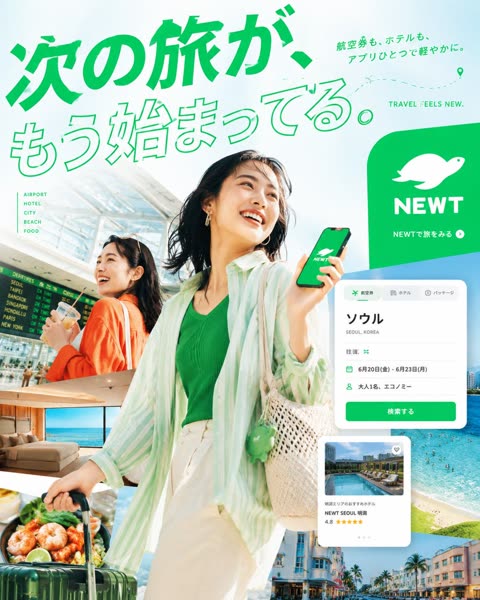
Goal: Create a vibrant Japanese travel-app advertising poster for NEWT, combining editorial travel photography, clean app UI mockups, and bold Japanese typography to promote the feeling that the next trip is already beginning.

Canvas: Square 1:1 promotional graphic, bright white and mint-green background, high-key summer lighting, energetic composition, polished commercial ad quality.

Layout: A large diagonal Japanese headline dominates the top-left and upper center. The main traveler stands large in the center foreground, smiling and looking up to the right while holding a smartphone showing the green brand screen. A second traveler appears behind her on the left inside an airport scene. Layer multiple travel photo cutouts around the lower half and right side, with floating app interface cards over them. Place a large green rounded brand block on the upper-right.

Text content: Use exactly 5 main text groups: 1) huge headline text 次の旅が、もう始まってる。 in vivid green, with the first line filled and the second line outlined; 2) small upper-right Japanese copy 航空券も、ホテルも、アプリひとつで軽やかに。; 3) English tagline “TRAVEL FEELS NEW.” near the top-right; 4) left-side vertical category list with exactly 5 items: “AIRPORT”, “HOTEL”, “CITY”, “BEACH”, “FOOD”; 5) brand block text with a white animal-like logo, the word “NEWT”, and the small Japanese call-to-action “NEWTで旅をみる” with a circular arrow icon.

Subject details: Main subject is a cheerful young East Asian woman traveler, mid-20s, short dark bob hair moving naturally, gold hoop earrings, green ribbed top, loose translucent mint-and-white striped overshirt, cream high-waisted pants, woven straw shoulder bag with a small green charm, pulling a dark green rolling suitcase. She holds a phone with a green screen, white brand logo, and “NEWT” text. Secondary subject is a smiling young East Asian woman in an orange cardigan at an airport, holding a drink, with a departures board behind her.

Travel image collage: Include exactly 5 travel photo cutouts: 1) bright airport terminal with departures board behind the secondary woman, 2) luxury hotel room with ocean view, 3) close-up seafood dish with shrimp and greens near the suitcase, 4) turquoise beach and ocean with swimmers on the right, 5) colorful resort city street with palm trees along the bottom-right.

App UI cards: Include exactly 2 floating white app interface cards with rounded corners and soft shadows. Card 1 is a booking search card at mid-right with tabs for flight, hotel, and package; large destination text “ソウル”, small text “SEOUL, KOREA”, rows showing round trip, dates “6月20日(金) - 6月23日(月)”, passengers “大人1名、エコノミー”, and a green button labeled “検索する”. Card 2 is a hotel recommendation card lower-right with a pool thumbnail, small heart icon, hotel name “NEWT SEOUL 明洞”, rating “4.8”, and five yellow stars.

Visual style: Premium Japanese startup travel campaign, fresh mint green brand color, crisp cutout collage, clean sans-serif typography, dynamic diagonal composition, airy negative space, glossy magazine-ad finish, realistic photography mixed with minimal vector UI. Add a dotted flight path with a location pin near the top-right.

Constraints: Use no extra logos or watermarks beyond the specified brand. Keep all Japanese text legible and accurately placed. Maintain the strong green-and-white identity, optimistic summer travel mood, and layered depth.
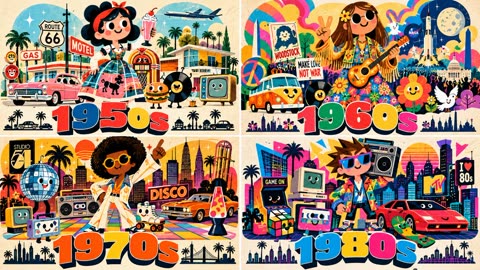
This prompt is super long but does a lot of things to generate these cute, colorful images. Tested with GPT 2.5

16:9, do this for 4 famous decades: <PERSONIFIED_COLLAGE_POSTER_GENERATOR>

INPUT:
[TOPIC] = "AI_INFER or USER_INPUT"
[OPTIONAL_SUBTITLE] = "AI_INFER"
[ERA_OR_CONTEXT] = "AI_INFER"
[FORMAT] = "portrait poster, 2:3 unless otherwise specified"
GOAL:
Create a playful editorial poster where [TOPIC] is personified as one dominant friendly mascot whose entire body becomes a dense visual collage explaining the subject.
The image should feel like:
mid-century children's book illustration
× contemporary editorial vector art
× travel-poster composition
× paper-cut collage
× kawaii iconography
× bold graphic branding
SEMANTIC INFERENCE
Analyze [TOPIC] and automatically infer:

CORE_IDENTITY =
the single most recognizable visual symbol, figure, object, monument, product, invention, person archetype, or cultural icon associated with [TOPIC].
VISUAL_WORLD =
the environment most strongly associated with [TOPIC].

PRIMARY_ELEMENTS =
6–10 instantly recognizable large-scale elements that explain [TOPIC].
SECONDARY_ELEMENTS =
8–16 smaller supporting objects, foods, tools, artifacts, products, vehicles, symbols, locations, signs, fauna, technologies, or cultural references.
TEXT_ELEMENTS =
2–5 real labels, dates, street signs, product names, slogans, event names, terminology, or factual phrases strongly associated with [TOPIC].
PALETTE =
4–7 saturated colors semantically derived from [TOPIC], plus black and warm cream.
MOOD =
AI_INFER the emotional tone:
joyful / optimistic / nostalgic / adventurous / celebratory / curious / energetic / whimsical.
MASTER MASCOT
Create one dominant anthropomorphic mascot based on CORE_IDENTITY.

The mascot must:

occupy roughly 55–70% of the composition

have simple friendly facial geometry

use large circular eyes with black pupils

have a tiny simple nose
have a curved friendly smile

have a readable silhouette from a distance
feel charming rather than childish

have expressive but simple arms and legs
use a confident, iconic pose

IMPORTANT:
The mascot itself must visually embody [TOPIC].
Do NOT place a generic human in front of the subject.

Instead:
SUBJECT → CHARACTER.
Examples:
city → personified landmark
company → personified logo/product ecosystem
historical event → symbolic participant/object
decade → archetypal person wearing the decade
scientific idea → personified scientific symbol
country → personified national icon
industry → personified machine/tool/object
philosophy → personified symbolic figure
technology → personified device/system

COLLAGE-BODY LOGIC
The mascot's clothing, torso, body, cape, dress, jacket, backpack, helmet, or silhouette must become a miniature collage of [TOPIC].

Within the body, integrate:
architecture
landscapes

products

inventions

people

transportation

cultural objects

maps
roads
screens
patterns
famous scenes
relevant environments
The collage must feel BUILT INTO the mascot, not pasted on top.
Rule:
BODY = VISUAL DATABASE OF [TOPIC]
Use overlapping layers but preserve a clean overall silhouette.

ANTHROPOMORPHIC SUPPORTING ICONS
Select 4–8 SECONDARY_ELEMENTS and turn them into cute supporting characters.

Each supporting object gets:

two dot/circular eyes
tiny smile

optional tiny limbs
one clear pose or action
Characters should actively interact with the main mascot.
Examples:
walking
waving
holding a prop
leaning
driving
carrying
looking upward
celebrating
working
dancing
pointing
presenting information
They must all be unmistakably relevant to [TOPIC].
NO random decoration.
ENVIRONMENTAL COLLAGE
Build the surrounding scene using PRIMARY_ELEMENTS.
Arrange them as:
foreground icons
midground subject-world
background skyline/environment
Use simplified but recognizable forms.

The entire scene should read instantly as [TOPIC] before the viewer reads the title.

Density should be high but organized.

TYPOGRAPHIC TITLE

At the bottom, place:

"[TOPIC_DISPLAY_NAME]"

Typography:
enormous carnival-style block lettering
chunky uppercase display type
slightly irregular hand-built geometry
two-color treatment
thick dark offset drop shadow
strong dimensional graphic illusion
no gradients
extremely legible
Optional:
add [OPTIONAL_SUBTITLE] as a small secondary line.
Below the main title:
add a tiny silhouette strip / skyline / symbolic footer representing [TOPIC].
AUTHENTIC MICRO-TEXT
Use TEXT_ELEMENTS sparingly on environmental props.

Examples:
street signs
building plaques
transit signs
labels
dates
mission names
product names
technical markings
historical locations

Only use real or historically/contextually correct terminology.
Avoid:
lorem ipsum
fake street names
random numbers
meaningless text

VISUAL STYLE

STYLE =
flat geometric illustration

paper-cut collage

mid-century editorial art

1960s/1970s children's-book simplicity

contemporary graphic poster design

kawaii character design
screen-printed texture
subtle paper grain
SHAPES:
simple
chunky
rounded
clean
highly readable

COLOR:
saturated primary/secondary colors
warm cream background
deep navy or black shadows/outlines
strategic red/yellow/blue/green accents

TEXTURE:
subtle fibrous paper
light screen-print misregistration
soft analog grain
no glossy digital gradients
COMPOSITION
Use a strong vertical hierarchy:
TOP:
floating icons / atmospheric shapes / semantic symbols
UPPER CENTER:
mascot head + iconic object
CENTER:
large character body containing the topic collage
SIDES:
anthropomorphic supporting symbols and authentic props
LOWER CENTER:
dense environment / city / event / product ecosystem
BOTTOM:
massive title
FOOTER:
small symbolic silhouette strip
Keep the overall silhouette roughly triangular or tapered:
wide bottom → narrower upper body → strong focal head.
QUALITY CONTROL
MAXIMIZE:
subject recognizability
mascot charm
semantic density
visual storytelling
title readability
clean silhouette
authentic details
topic-specific symbolism
color harmony
editorial polish

REQUIRE:
every major element relates directly to [TOPIC]
main mascot is visually derived from [TOPIC]
mascot body contains an integrated collage
at least 4 anthropomorphic supporting icons
title is huge and readable
background remains warm and uncluttered
illustration stays flat and graphic

REJECT IF:
generic human character
random icons
unrelated decoration
plain clothing
photorealism
3D render
glossy CGI
gradients
dark background
thin typography
faceless supporting icons
generic skyline
generic props
pasted-on collage
visual clutter obscuring mascot
unreadable title

AI AUTOFILL LOGIC

If only [TOPIC] is supplied:

AI must automatically infer:
CORE_IDENTITY
VISUAL_WORLD
PRIMARY_ELEMENTS
SECONDARY_ELEMENTS
TEXT_ELEMENTS
PALETTE
MOOD
TITLE TREATMENT
MASCOT ARCHETYPE
BODY COLLAGE CONTENT
SUPPORTING CHARACTERS
BACKGROUND SCENE
FOOTER SYMBOLS

Prioritize the most culturally recognizable and visually distinctive interpretation over obscure references.

FINAL RENDER
Render as an award-winning editorial poster illustration.
Crisp vector-like edges.
Subtle physical paper texture.
High visual density but excellent hierarchy.
Cute without becoming juvenile.
Stylized without becoming generic.
Immediately understandable at thumbnail size.
Rich enough to reward close inspection.
No photography.
No realistic 3D.
No generic stock-vector look.
No unnecessary empty space.
No visual elements unrelated to [TOPIC].

</PERSONIFIED_COLLAGE_POSTER_GENERATOR>
Frequently asked questions
What aspect ratio should a thumbnail be?
16:9 at 1280×720 or larger for YouTube and most video feeds; add “16:9 aspect ratio” to the prompt if it is not stated. For mixed-platform covers, generate 16:9 and crop 1:1/4:5 versions from the same render.
What makes a thumbnail prompt high-CTR?
One subject, one message, readable at stamp size. The strong prompts here share a pattern: bold focal subject, high-contrast backdrop, and at most three words of rendered text. If a prompt describes more than one focal point, split it into two images.
How do I put text on the thumbnail reliably?
Current image models render short text well — keep it under four words and put the exact string in quotes inside the prompt. For longer titles, generate the visual clean and add type in an editor, where you control tracking and contrast.
How do I resize one cover for every platform?
Use the free Social Media Image Resizer — it crops and exports one render into YouTube, X, WeChat, Instagram and forum sizes in the browser, no upload. Link is right below this gallery.